Setup
In this section we will configure Kiro CLI along with the MCP server for Amazon EKS to work with the EKS cluster using natural language commands.
Kiro CLI is leverages generative AI capabilities for common development and operations tasks. Its capabilities can be enhanced by adding purpose-built MCP servers for specialized knowledge. We'll use the Amazon EKS MCP server with Kiro CLI in this section. You can find a catalog of AWS-provided MCP servers here, which can be used with Kiro CLI in a similar way.
First, download the Kiro CLI release for your operating system and CPU architecture:
Install Kiro CLI:
Verify the installation:
kiro-cli 2.10.0
Next, we'll configure Kiro CLI with the Amazon EKS MCP server. Here is the configuration we'll use:
{
  "mcpServers": {
    "awslabs.eks-mcp-server": {
      "command": "uvx",
      "args": [
        "awslabs.eks-mcp-server@0.1.32",
        "--allow-write",
        "--allow-sensitive-data-access"
      ],
      "env": {
        "FASTMCP_LOG_LEVEL": "ERROR"
      },
      "autoApprove": [],
      "disabled": false
    }
  }
}
Configure the MCP server and install the required uvx tool:
uvx is a Python package runner tool that comes with the uv package manager. It runs Python packages directly without installing them globally. Then, it downloads and executes Python tools in isolated environments similar to npx for Node.js, but for Python packages.
To use Kiro CLI, you'll need to authenticate using either an AWS Builder ID or a Pro license subscription.
You can create a free AWS Builder ID by following these instructions. This Builder ID can also be used for personal use of Kiro CLI.
? Select login method >
> Use with Builder ID
Use with Google
Use with GitHub
Use with Your Organization
Select your preferred login method and follow the prompts to login. If you don't already have a Kiro account, you may create a free-trial account using either your Google or GitHub account. You'll need to open a given URL to use link your Google or GitHub account.
A Kiro free-trial account should give you 50 Kiro credits to begin with. This lab may only need less than 5 credits. So, you may use that account even outside this workshop to continue your Kiro trial for other projects. You may check your used credits using /usage command inside a kiro-cli session. No payment details will be required to create a Kiro free-trial account.
Let's verify that the MCP server is available by initializing a session:
To see the tools offered by the EKS MCP server, run:
/tools
You should see output similar to this:
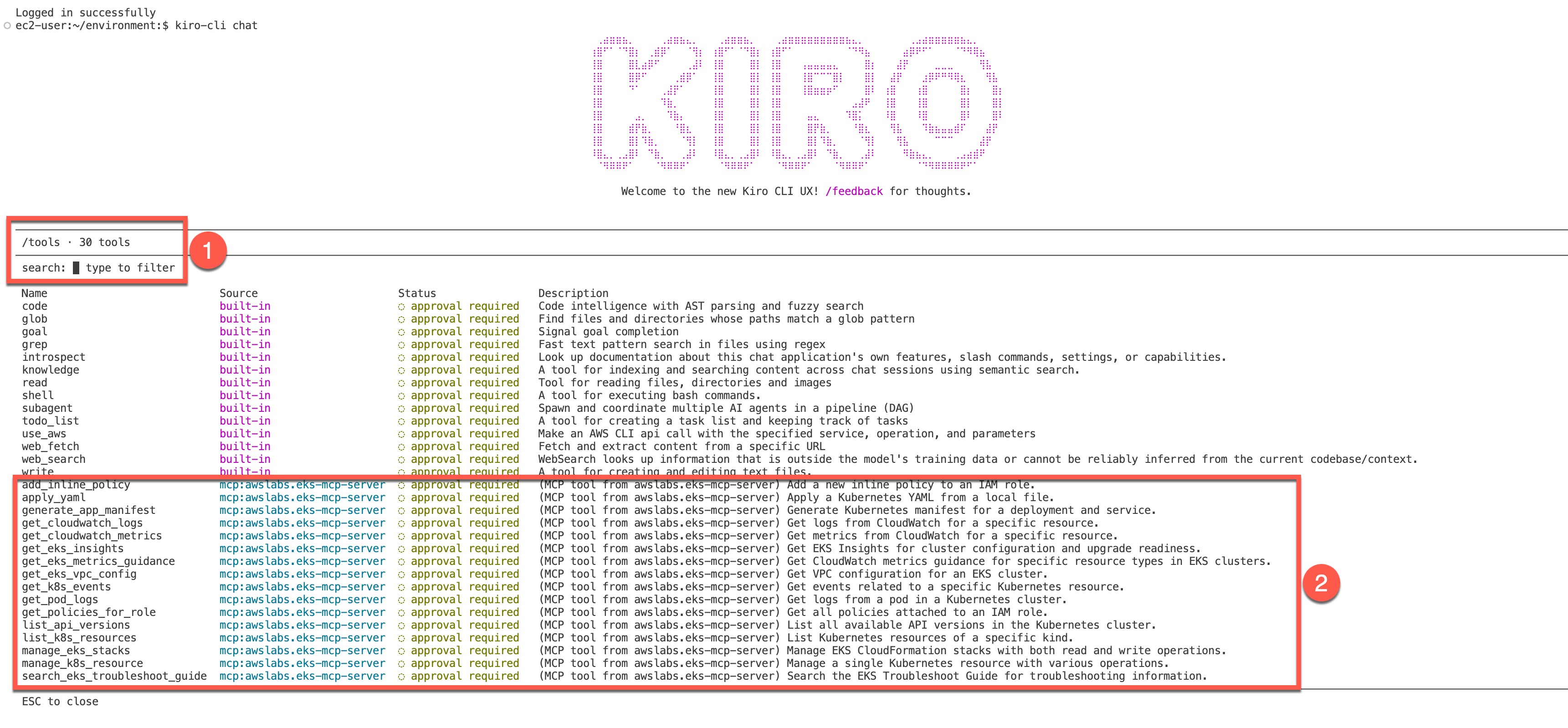
The output shows:
- The space where you can run Kiro commands like
/tools. You should see all such commands when you type/. Learn more about Kiro commands here. - The list of tools offered by the EKS MCP server
When a tool is marked as approval required, Kiro CLI will request your permission before using it. This is a safety measure, particularly for tools that can create, update, or delete resources. Since LLMs can make mistakes, this gives you an opportunity to review potentially disruptive actions before they're executed.
You can follow the same procedure to add other MCP servers from AWS Labs for additional capabilities. For this lab, we'll only need the EKS MCP server we've configured.
In the next section, we'll use Kiro CLI to retrieve information about our EKS cluster.